





Overview
- The “which AI should we use” question almost always hides a more useful one underneath, i.e., what we are trying to do with it. Sorting AI models by modality, size, training approach, and openness makes that question answerable.
- Recent data from April 2026 highlights a massive shift in corporate adoption: Anthropic’s Claude now captures 34.4% of surveyed US businesses paying for AI, running neck-and-neck with OpenAI’s 32.3% (per VentureBeat). But the more interesting operational trend isn’t brand loyalty – it’s that high-performing teams are now deploying two or three different AI models simultaneously based entirely on the task at hand.
The “which AI should we use?” Question is the Wrong One
Most teams in 2026 ask which AI model to use before answering what the model is actually for. Sometimes that means a frontier model burning token costs on a task that a smaller, fine-tuned one could handle for a tenth of the price. Other times, it means a lightweight on-device model pushed into a workflow that needs full reasoning.
Algoryte’s data science and AI engineers spend the first week of most engagements pulling that question apart. What follows is the short version:
How AI models differ by what they take in (modality), how big they are (size and deployment), how they were trained (training approach), and whether the code is open (openness) – and a way to read your own use case against each one.
What is an AI Model & Why Does the Category Matter?
An AI model is a trained system that takes an input and produces an output. Its training data, architecture, and deployment shape what it is good at, what it costs, and where it can run. Two models can both be called large language models and behave very differently in your stack.
Category matters more than brand. A 1.5B open-weight model on a phone is a different deployment from a frontier model behind an API. The four lenses below are the ones we use most often when scoping an AI build.
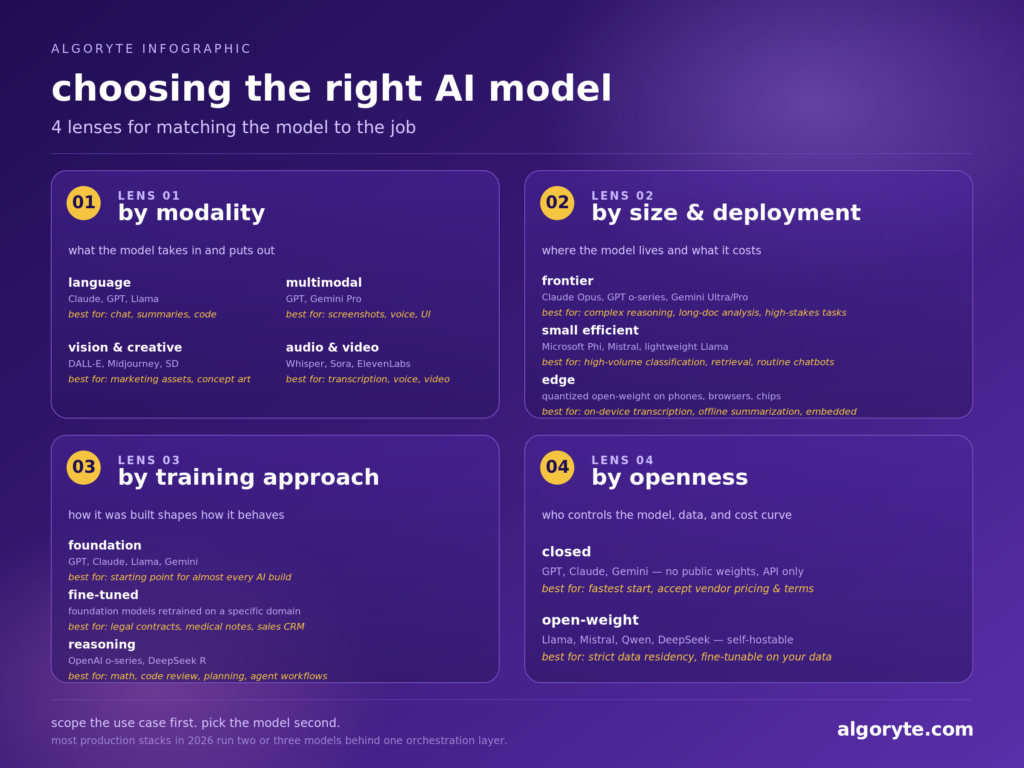
1. AI Models by Modality
Modality describes what the model takes in and puts out. It is the first filter because the wrong modality means the model physically cannot do the job:
Language Models (e.g., Anthropic Claude Sonnet, OpenAI GPT text-mode, Meta Llama)
They handle text in and text out. These are best for chat, drafting, summarization, classification, and code. They remain the default choice for the vast majority of B2B knowledge assistants and internal database tools.
Multimodal Models (e.g., OpenAI GPT, Google Gemini Pro)
These natively process text, images, and audio simultaneously. This is the correct choice for workflows that mix live screenshots, voice input, and complex UI parsing, where routing inputs to separate single-purpose models would create immense latency and coordination overhead.
Vision & Creative Models (e.g., OpenAI DALL-E, Midjourney, Stability AI Stable Diffusion)
These generate or heavily manipulate images from text prompts. They are built for marketing asset pipelines, concept art, and product visuals (not for logical reasoning or analytical tasks).
Audio & Video Models (e.g., OpenAI Whisper & Sora, ElevenLabs, Runway)
These handle specialized media generation and transcription. They excel in voice synthesis and video storyboarding, though generation times and processing costs currently make video models a poor fit for real-time application outputs.
A creative studio pipeline is often a stack of three or four modality-specific models. A B2B knowledge assistant is almost always just a language model. Overbuilding on modality before the use case requires it is one of the more common early mistakes.
2. AI Models by Size & Deployment
Size determines where a model can live and what it costs to run, which often matters more than raw capability:
Frontier Models (e.g., OpenAI o-series, Anthropic Claude Opus, Google Gemini Ultra/Pro)
These are massive, cloud-hosted systems with elite capabilities. They are the right call for complex reasoning, long-document cross-referencing, and high-stakes tasks where a single logical error costs more than the API fee. At Uber, engineers reported monthly Claude API costs of $500 to $2,000 per person, per VentureBeat. That is defensible at Uber’s engineering scale. For a 20-person team routing routine support tickets through a frontier model, it is a budget problem waiting to happen.
The pattern we see repeatedly: A frontier model gets chosen because the initial demo was impressive, API costs compound quietly for three months, and the optimization project required to fix the budget ends up costing more time than proper initial scoping would have.
Small Efficient Models (e.g., Microsoft Phi, Mistral, Meta Llama lightweight versions)
They are faster, cheaper, and small enough to run inside a corporate VPC. The right fit for high-volume classification, retrieval, and routine chatbots, where the task is well-defined, and the volume is high enough that per-token cost matters.
Edge Models
These are quantized open-weight models running on phones, browsers, and embedded chips. The only viable option when privacy or latency rules out a network call entirely – on-device transcription, offline summarization, or embedded assistants.
Most production systems worth building use two or three models behind one orchestration layer, routing simple work to a small model and complex work to a frontier model. A single-model setup is usually a sign that the use cases have not been broken down enough.
3. AI Models by Training Approach
How a model was trained shapes what it knows, how it reasons, and how much customization is practical on top of it:
Foundation Models (e.g., OpenAI GPT, Anthropic Claude, Meta Llama, Google Gemini)
These are trained broadly, then adapted via prompting or fine-tuning. The starting point for almost every AI build.
Fine-Tuned Models
They are foundation models retrained on a specific domain – legal on contracts, medical on clinical notes, or sales on CRM tickets. They beat general models on the narrow job at a fraction of the per-token cost. The most common mistake here is not picking the wrong model – it is failing to break the use case into sub-tasks first. A workflow that appears to need a frontier reasoning model often consists of five steps: two that require reasoning and three that are straightforward retrieval or formatting. Running the entire workflow through a single expensive model is equivalent to hiring a senior engineer to copy-paste spreadsheets. Break the task down, and the model selection almost decides itself.
Reasoning Models (e.g., OpenAI o-series, DeepSeek R-series)
Such models are optimized for multi-step logical work. They think before answering – higher latency and cost, but significantly better on math, code review, planning, and agent workflows. If reasoning matters more than speed, use a reasoning model. If you need fast and accurate responses within a specific, well-defined domain, a fine-tuned, smaller model usually wins on both speed and cost.
4. AI Models by Openness
The difference between open and closed models comes down to control over where the model runs, how you customize it, and what happens to your product if the provider raises prices or changes their terms.
Closed Models (GPT, Claude, Gemini)
They have no public weights. You consume them via API and accept the provider’s pricing, rate limits, and terms. It is straightforward to start with, but the dependency is real.
Open-Weight Models (Llama, Mistral, Qwen, DeepSeek)
They have weights you can download, fine-tune, and deploy on your own infrastructure. Often, it is the only practical choice for teams with strict data-residency requirements. On highly complex software engineering benchmarks like SWE-bench Verified, leading frontier APIs and top-tier open-weight models (when properly fine-tuned) perform within single-digit percentage points of one another. That tiny performance gap rarely decides the call when the open model is cheaper, fine-tunable on your data, and stays entirely inside your network. For teams in regulated industries (healthcare, finance, legal), open-weight architectures are frequently the only setups that pass a strict compliance review, not a compromise.
How Should Businesses Actually Choose an AI Model?
Four questions cut through most of the noise:
Is the output going to a human or another system? If the output is going to another system rather than a human, speed and cost matter more than eloquence. A smaller, faster model almost always wins.
Does the task require multi-step reasoning or just retrieval? Reasoning models earn their cost on planning, code review, and complex document analysis. For retrieval, summarization, and classification, a fine-tuned smaller model is faster, cheaper, and often more accurate within its domain.
Does your data need to stay inside your network? If yes, open-weight is the path regardless of the capability gap. No API arrangement fully substitutes for data residency when compliance is a hard requirement.
Is this high-volume and repetitive, or low-volume and complex? High-volume routine work rarely needs a frontier model. The cost math breaks down quickly.
If these four questions surface more complexity than expected, Algoryte’s AI team can walk through the scoping with you before any model or vendor decision is made.
Conclusion
Picking an AI model is a scoping problem, not a vendor problem. The teams that get this right are not the ones with access to the best models – they are the ones who resist the pull of the impressive demo long enough to ask what the model is actually being asked to do, where the data needs to live, and what failure looks like at the task level. That discipline is what separates a system that scales from one that gets quietly decommissioned six months after launch.
If you would like an outside read on which models fit your use case, talk to Algoryte’s team. We scope the use case first and recommend models second – because the sequence matters.
FAQs
1. What is an AI model?
An AI model is a trained system that takes an input – text, image, audio, or video – and produces an output. The training data, architecture, and deployment determine what it is good at, how much it costs, and where it can run. GPT, Claude, Llama, DALL-E, and Whisper are all AI models, but they sit in different categories and solve different jobs.
2. What are the differences between open-source and commercial AI models?
Commercial AI models are proprietary systems managed entirely by a provider (like OpenAI or Anthropic); they offer elite performance out of the box via an API but require ongoing per-token fees and absolute vendor dependency. Open-source (open-weight) models allow you to download the core software to run and customize it on your own servers. This approach eliminates external API usage fees and guarantees total data privacy, though your team must handle the underlying infrastructure hosting costs and technical maintenance.
3. Which AI model is best suited for my specific task?
To keep performance high and compute costs low, you should map your workflow to the right model tier:
- Frontier & Reasoning Models: Use these for complex, high-stakes tasks like deep document analysis, advanced programming/code reviews, multi-step logical planning, and autonomous agents.
- Small Efficient Models: Choose these for high-volume, routine operations like text classification, basic customer support chatbots, data sorting, and fast information retrieval.
- Fine-Tuned Models: Deploy these when your workflow relies entirely on highly specific industry terminology or proprietary internal knowledge, such as legal contract analysis or medical chart parsing.
- Edge Models: Opt for these when your application must run directly on local devices (like phones or browsers) to ensure zero internet latency, full offline functionality, or absolute on-device data privacy.
4. Should businesses pick one AI model or use several?
Most production systems in 2026 use two or three. A common pattern routes simple, high-volume tasks to a small or fine-tuned model and reserves a frontier model for harder queries. A single-model setup is usually a sign that the use cases have not been broken down enough.
5. What strategies work for managing the full lifecycle of AI models in enterprise environments?
Three things matter most: decompose tasks before selecting models so each model has a narrow, maintainable job; build an orchestration layer that keeps your architecture model-agnostic so swapping or upgrading models doesn’t break the product; and monitor for output drift, not just uptime, because a model that was accurate at launch degrades as your data and domain evolve. Retraining should be a scheduled operation, not an afterthought.
6. How do businesses find the right consulting firms for AI model strategy and implementation projects?
The right firms scope the use case before recommending a model or stack – any engagement that opens with a vendor recommendation is a flag. Look for experience across the full build: model selection, integration, orchestration, and post-launch monitoring, not just the strategy layer. Algoryte’s AI and data science team works across the full implementation lifecycle. Talk to our team.